Winter Clock live wallpaper download for android 10 (Quince Tart)
APK file Winter Clock live wallpaper 7.0 compatible with Android 10How to install APK / APKS / OBB file on Android
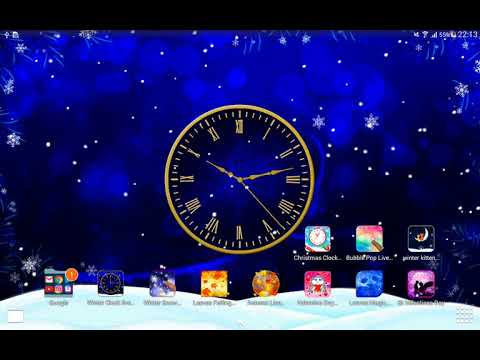

release of live wallpapers with stunning effects and graphics. Install free.
Live wallpaper Winter Clock live wallpaper can be used in the horizontal and vertical positions of the device.
4K images are completed in accordance with the subject of application. Available scrolling of backgrounds. See representative example on the screenshots.
Overlay can be activated to the consumer installations.
Live Wallpaper contains fantastic animation - lights and tinsel. High quality animated graphics changes the trajectory on touch.
The relevant section of the settings set number of animations.
Having the effect of frost on the glass or frozen glass - tune and switch in the settings section. Disable animation "erasing" the desired area by touching the display.
-----
Detailed description of the application installation:
- Free download live wallpaper Winter Clock live wallpaper.
- Settings -> Apps -> find and activate "Winter Clock live wallpaper"
-----
Application Winter Clock live wallpaper works reliably on all today's popular mobile devices Android. Live Wallpaper have ads.
Please, Do not overload Application by lots of special effects and animations - it can harm the normal operation of your application.
If you have any problems with the installation or use live wallpaper, send the error message to e-mail us and we will try to help you.
- LicenseFree
- File nameWinter Clock live wallpaper
- File Version7.0
- Package namecom.godsgiftsph.winterclocklivewallpaper
- Size1.62 MB
- UploadedOctober 25, 2018
- Android4.0.3 or later
- CategoryPersonalization
- DeveloperGods Gift
- Developer emailgodsgiftsph@gmail.com
- md5 hash66f36d2db5427f0469ea20f04e9fd19a
- Architecture-
- Permissionsshow (2)